The best trail cameras for beginners

GardePro E5S
$48.99 listed price, changes oftenPicks by experience level
Beginner
 WOSPORTS Mini Trail Camera$23.99
The smallest, cheapest camera here with the simplest menu of the bunch, a good way to try trail cameras for the first time without much money at risk. It trades away image quality and night range compared to the pricier picks, so it suits casual use over serious scouting.
Check priceIntermediate
GardePro E5S$48.99A bigger screen and clearer menu than the smallest budget cameras, still simple SD-card-only operation with no plans or apps to configure, and better night image quality for actually identifying what triggered it. This is the easiest camera on the list to recommend without a caveat.
Check priceExpert
 SPYPOINT Flex-M with SD card$67.99
A SPYPOINT Flex-M bundled with an SD card, the easiest on-ramp into cellular if you want photos sent to your phone without a separate SD-card pull. It adds a monthly plan decision and an app setup step, so if you just want to check a camera in person every couple of weeks with zero ongoing cost, skip cellular and stick with the intermediate pick instead.
Check priceWhat makes a trail camera easy to use for a first-timer?
The biggest difference between a "beginner-friendly" camera and a fiddly one is the menu: how many settings you have to touch to get usable photos, and how clear the screen is when you do. A camera with a simple photo-only mode, sensible factory defaults and a small handful of settings (trigger delay, photo count, night or day mode) is far easier to live with than one buried in submenus for video resolution, time-lapse scheduling and multi-shot burst settings you will likely never touch. SD-card-only cameras are inherently simpler than cellular ones, since there is no app account, plan tier or signal strength to think about, just a card to pull and a viewer to check it with.
Should a beginner start with an SD card camera or a cellular camera?
Start with SD card if you want the absolute simplest setup: mount it, put in batteries and a card, and pull the card every so often with a card reader or viewer, like the Cabor USB-C viewer, to check photos in the field. Start with cellular if the appeal of trail cameras for you is checking photos on your phone without a trip out to the woods, and you are comfortable picking a monthly plan and doing a short app setup once. Both paths are genuinely beginner-friendly if you pick a camera built for it; the SPYPOINT Flex-M bundle in particular walks you through pairing in the app step by step.
What should a first-time buyer skip?
Skip GPS tagging, live view, multi-camera app dashboards and high-megapixel interpolated modes on a first camera; none of that makes the camera easier to use, and most of it adds settings to configure before you get to the part that matters, which is getting a clear photo of what walked by. Skip solar panels and proprietary battery packs too, at least at first; a set of lithium AA batteries is simpler to manage and plenty for learning how a camera behaves before committing to a season-long setup.
How do these beginner cameras compare?
| Camera | Type | Setup | Best for |
|---|---|---|---|
| WOSPORTS Mini | SD card | Simplest menu | First-ever camera, casual use |
| GardePro E5S | SD card | Simple, clearer screen | Most beginners |
| GardePro A3S | SD card | Simple, no-glow flash | Slightly more serious scouting |
| SPYPOINT Flex-M with SD card | Cellular | App-guided | First cellular camera |
How we chose these picks
These picks come from published menu structure, feature count and setup steps described on each listing and in verified owner reviews, prioritizing cameras owners describe as simple to configure. This is a research-based roundup; we have not personally unboxed and set up each of these cameras.
Buying tips for a first trail camera
Buy a spare SD card and a set of lithium AA batteries at the same time as the camera; running out of either on the first outing is the most common early frustration. Read the quick-start card that comes in the box rather than skipping straight to mounting the camera, since factory default settings are usually fine but a few minutes reviewing them saves a wasted trip if something like the date or trigger delay is off. If you are placing the camera to scout for deer, check your state wildlife agency's rules on trail camera use before you start, since some states restrict cellular or transmitting cameras during hunting seasons or on public land.
More picks worth a look
Listed prices change often; the button shows the current price.
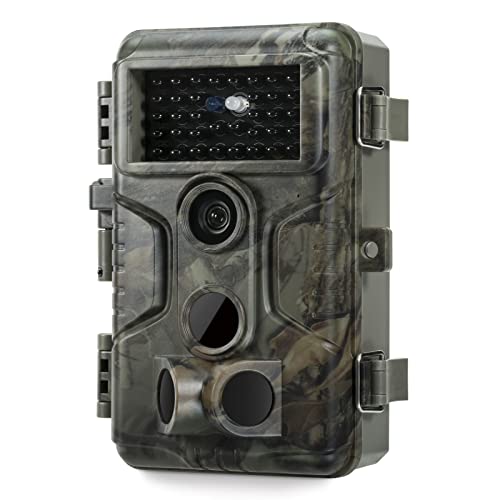 SD-card trail camera GardePro A3S $68.39
 A step up in build and menu clarity from the entry-level picks, the GardePro A3S is still simple SD-card operation with no-glow flash.
Specs and variants Check price SD-card trail camera Stealth Cam G42NG $69.99
 A straightforward Stealth Cam with a no-frills menu, a solid alternative if GardePro is out of stock.
Specs and variants Check price SD-card trail camera WOSPORTS Mini Trail Camera (2-pack) $59.99 for 2 cameras
 A 2-pack of the WOSPORTS Mini lets a first-time buyer cover two spots for not much more than one camera elsewhere.
Specs and variants Check priceFrequently asked questions
What is the easiest trail camera to set up?
A simple SD-card camera like the GardePro E5S or WOSPORTS Mini is the easiest starting point, since there is no app account or monthly plan to configure, just batteries, an SD card and the camera's basic menu. For an easy first cellular camera, the SPYPOINT Flex-M with SD card bundle uses app-guided pairing that walks you through setup step by step.
Do I need a cellular trail camera as a beginner?
No. Cellular adds convenience (checking photos on your phone) but also adds a monthly plan decision and an app setup step. A simple SD-card camera is genuinely easier to live with for someone just learning how trail cameras behave, and it costs nothing ongoing.
What settings should a beginner use on a trail camera?
Stick with the factory defaults for most settings and only adjust trigger delay and photo count if you are getting too many or too few photos per visit. See the trail camera settings guide for a fuller walkthrough, but as a beginner, resist the urge to touch every setting the menu offers.
How do I view photos from a trail camera without a computer?
A small USB-C card reader that plugs into a phone, like the Cabor viewer, lets you preview an SD card's photos in the field without carrying a laptop. Cellular cameras skip this step entirely by sending photos straight to an app on your phone.
Researched from published specifications, brand plan lists and verified owner reviews; we do not claim hands-on testing. General information, not professional, legal or security advice. Trail camera rules differ by state: some restrict transmitting cameras during hunting seasons or on public land, so check your state wildlife agency. Recording and audio laws vary; only record where you have the right to.